
Best Golf Launch Monitors
Most club golfers practise by feel — hit ball, watch flight, repeat. The problem is that feel lies. The best golf launch monitors give you the numbers behind the ball flight, turning vague feedback into something you can actually act on.
The launch monitors on this list are designed for club golfers who want to practise smarter — whether that’s indoors over winter, on the driving range, or in a home simulator setup. They range from simple radar units that tell you your swing speed in seconds, through to dual-camera systems that capture spin rate, shot shape, and ball-flight video alongside full course simulation. Here’s what each one measures, who it suits, and what you need to know before buying.
Product Reviews
Garmin Approach R10
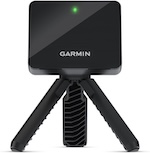
The Garmin Approach R10 is the launch monitor that genuinely changed the consumer market when it launched — affordable, compact, and accurate enough to be useful. Two years on, it remains the most sensible default choice for UK club golfers who want meaningful data without spending four figures.
It uses Doppler radar to track the ball from the moment of impact, and pairs with the Garmin Golf app to display and record your shot data. The metrics it covers are the ones that matter most: ball speed, clubhead speed, smash factor, launch angle, spin rate, carry distance, and shot shape. That’s a data set that, even a few years ago, would have required a £10,000 trackman in a fitting bay. You get it from a device that clips to a tripod and fits in your jacket pocket.
Setup is quick. Place the R10 roughly 2 metres behind the ball, connect it to your phone via Bluetooth, and it’s ready. The companion app shows each shot’s data in real time, stores your history, and lets you compare clubs side by side — useful for benchmarking your bag or validating a new club purchase. It also offers a basic home simulator mode, where you can play virtual rounds on licensed courses, though this requires an active Garmin Golf app subscription (check garmin.com for latest prices).
Outdoors on the range, accuracy is strong. Indoors, it performs well with enough net depth (ideally 3 metres or more), though club selection data can be slightly less consistent on very short indoor swings. The R10 measures the ball, so it works with any standard golf balls — no stickers, no proprietary balls required.
For club golfers who want a practical, well-supported launch monitor backed by a brand with genuine customer service, the R10 is the benchmark at this price point.
- PROS:
- Tracks all the key data points — ball speed, swing speed, spin rate, launch angle, carry distance, and shot shape — in a device small enough to fit in a jacket pocket.
- Works with any standard golf balls, no proprietary balls or adhesive stickers required.
- Garmin Golf app stores full shot history and lets you compare clubs, track progress over sessions, and run basic course simulation.
- Strong brand support and widespread availability on Amazon.co.uk.
- CONS:
- Course simulation and some advanced practice modes require an active Garmin Golf app subscription — the core data features work without it, but the full experience does not.
- Accuracy in very tight indoor setups (less than 3 metres of net depth) is less consistent than outdoor or larger indoor environments.
- Spin rate readings, while included, are less accurate than more expensive radar units — directionally useful rather than precisely comparable to a tour-level device.
SCORE: 8/10
Rapsodo MLM2PRO Mobile Launch Monitor + Golf Simulator
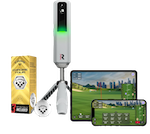
The Rapsodo MLM2PRO is the most ambitious portable launch monitor on this list — a dual-technology system that combines radar tracking with two built-in cameras to give you data and video in a single compact unit. That combination is what separates it from pure-radar alternatives, and for golfers who want to understand not just what their numbers are but what they look like, it’s genuinely compelling.
Here’s how it works. The radar handles ball speed, clubhead speed, launch angle, and carry distance — the same measurements you’d get from any Doppler radar device. The cameras add something different: they capture impact location on the face, shot replay footage, and — when used with Rapsodo’s RPT golf balls — accurate spin rate and spin axis data. That impact-location feedback is particularly useful for club golfers. Knowing you caught it on the heel explains a lot more than a carry distance number alone.
The companion app, the Rapsodo Golf App, is one of the better pieces of software in this category. Shot replay, 3D ball-flight visualisation, session history, and club-by-club stats are all clean and well-organised. Simulator mode lets you play virtual courses or practice on driving range simulations. Some of these modes are behind a subscription (the free tier is fairly limited), so factor that into the total cost.
The main caveat is spin measurement. Accurate spin rate and spin axis data — two of the most useful data points for understanding shot shape and compression — only work with Rapsodo’s own RPT balls, which have a tracking dot the cameras read. With standard balls, spin data is either estimated or unavailable. If spin is a priority, budget for RPT balls alongside the device.
Indoors, the MLM2PRO performs well provided you have reasonable net depth. Outdoors, the cameras work better in moderate light than in very bright sunlight. It’s the launch monitor for golfers who want more than numbers — and who are willing to manage the subscription cost and ball requirement that come with the full feature set.
- PROS:
- Dual camera and radar system delivers data and visual feedback — impact location and shot replay — that pure-radar units can’t match.
- One of the strongest companion apps in the consumer market, with 3D ball-flight, shot history, club comparison, and simulator modes.
- Usable indoors and outdoors, with structured practice modes alongside course simulation.
- Spin rate and spin axis measurement is among the most accurate available at this price when used with RPT balls.
- CONS:
- Accurate spin measurement requires Rapsodo’s own RPT golf balls — standard balls give estimated or absent spin data, which limits usefulness for golfers who don’t want to use proprietary balls.
- Full simulator and course-play features require an active subscription — the free tier is more limited than some competitors.
- Camera-based elements perform less consistently in very bright outdoor light or very tight indoor setups.
SCORE: 9/10
FlightScope Mevo Gen2 Portable Golf Launch Monitor and Simulator
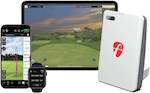
The FlightScope Mevo Gen2 is built by a company that also makes the Mevo+ and the X3 — professional-grade launch monitors used on tour and in fitting studios worldwide. The Mevo Gen2 is the entry point into that ecosystem, and it carries forward some of what makes FlightScope’s more expensive devices worth the money: specifically, a radar system that has been developed and refined over years of professional-level use.
What sets it apart from the R10 and most other consumer devices is the data breadth. The Gen2 tracks 18 parameters, including spin rate, spin axis, angle of attack, carry, total distance, and side carry — covering not just what your ball did, but how your club delivered it. For golfers who are working with a coach or want to dig into why their swing produces the ball flight it does, that extra data is genuinely useful rather than decorative.
The front-facing camera records video of each swing alongside a shot tracer overlay — so you can watch the ball flight mapped onto your actual swing footage. That combination of data and visualisation is rare at this price point.
One important practical note: full data accuracy requires the supplied metallic stickers to be placed on the ball. Without them, some metrics — particularly spin — become estimated. On the range, this means either using range balls you’ve prepped yourself (which most people won’t bother with) or buying your own balls and stickering them. It’s a manageable workflow at home but impractical if you’re grabbing a bucket at a public range.
The Gen2 also includes lifetime access to E6 Connect simulation software — no ongoing subscription fee — which is a meaningful advantage over devices that charge monthly for course play. E6 Connect includes a solid library of courses and driving range modes, and it’s the simulator platform used in many professional fitting and practice environments.
Battery life is around six hours, which is shorter than the R10 but fine for a typical range session or extended indoor practice. The device connects to a phone or tablet via Wi-Fi rather than Bluetooth, which gives it a more stable data connection for video and shot replay.
- PROS:
- 18-data-parameter tracking is the broadest data set on this list — includes spin axis, angle of attack, and side carry alongside the standard metrics.
- Lifetime E6 Connect simulator access with no subscription required is a genuine long-term saving compared with subscription-dependent alternatives.
- Front-facing camera with shot tracer adds visual ball-flight feedback on top of the data.
- Built by a company with professional-grade radar experience — data quality reflects that lineage.
- CONS:
- Full accuracy for spin rate and related metrics requires metallic stickers on the ball — impractical with shared range balls and adds a prep step to home sessions.
- Battery life of around six hours is the shortest on this list, though sufficient for a normal practice session.
- Wi-Fi connection (rather than Bluetooth) requires a few extra steps to set up compared with simpler devices.
SCORE: 9/10
Voice Caddie Sc300I Portable Golf Launch Monitor (2021)
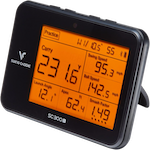
Every launch monitor on this list except one requires a smartphone to display your shot data. The Voice Caddie SC300i is the exception. It has a built-in LCD screen that shows your numbers immediately after each shot — no phone, no app, no Bluetooth pairing required. That single design choice makes it the most practical launch monitor for golfers who want quick feedback at the range without managing a phone mount or worrying about glare on a screen.
The data it displays covers the essentials: carry distance, total distance, ball speed, clubhead speed, launch angle, and smash factor. It also reads out carry distance audibly via voice, which means you can hear your result without breaking your pre-shot routine to look at a screen. There’s a remote control included so you can scroll through data or switch clubs without walking back to the unit.
App connectivity is available — you can export session data for post-practice review — but it’s optional rather than essential, which is the right approach for a device aimed at golfers who want simplicity.
The trade-offs for that simplicity are real. Spin rate, shot shape, and ball-flight visualisation aren’t available. There’s no simulator mode. The data set is narrower than the R10, MLM2PRO, or Mevo Gen2. For golfers who want to understand why their ball curves or work on spin rate, the SC300i won’t give them that.
But that’s not who this device is for. It’s for the club golfer who wants to know their carry distances accurately, check whether a swing change is adding speed, or benchmark their bag — and wants to do it without fussing with technology. On the range, with a bucket of balls, it’s one of the most frictionless experiences in the category.
- PROS:
- Built-in LCD screen displays shot data without requiring a smartphone — the most practical option for uninterrupted range sessions.
- Voice distance readout means you can hear your carry distance without looking away from the setup position.
- Tracks the key practical metrics — carry, total distance, ball speed, swing speed, smash factor, and launch angle — that most club golfers actually need.
- Remote control included, so you can scroll through data without walking back to the unit between shots.
- CONS:
- No spin rate, shot shape visualisation, or ball-flight metrics — the data set is noticeably narrower than app-based competitors at similar or lower prices.
- No simulator mode or structured practice modes — data only, no virtual course play.
- App integration is available but limited — this is primarily a standalone device, not a platform for deeper analysis.
SCORE: 7/10
PRGR Portable Golf Launch Monitor
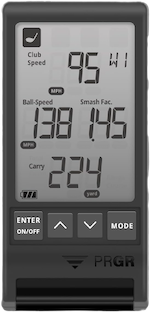
The PRGR (pronounced “progress”) is the simplest launch monitor on this list by design. It measures five things — swing speed, ball speed, carry distance, total distance, and smash factor — displays them on a small built-in screen, and does nothing else. No app, no Wi-Fi, no Bluetooth, no subscription. Turn it on, place it behind the ball, and swing.
That stripped-back approach has made it genuinely popular in a specific situation: golf lessons and club fitting studios, where coaches want quick speed and distance data without the overhead of setting up a more complex system. It’s also the go-to recommendation for golfers who want to track their swing speed training progress — swing speed training programmes like SuperSpeed Golf or Stack System involve hitting submaximal and maximal effort swings at a training stick, not a ball, and the PRGR reads those just fine.
As a primary launch monitor for a club golfer who wants to understand their game, it falls short. You won’t know your spin rate, launch angle, or shot shape. Distance readings are displayed in both carry and total yards modes, and you can set the club type — the PRGR covers the full set from driver through fairway woods, hybrids, irons, and wedges — which means the estimates are calibrated to the club in hand rather than generic. Previous swings can be reviewed by pressing the back button, so you’re not completely without shot history. But there’s no app, no session export, and no visual feedback. If you need spin data, shot shape, or any kind of structured practice mode, spend more and get the R10 or SC300i.
But if you’re training with a speed programme, want a quick sanity-check number during a session, or simply need the cheapest way to confirm your swing speed is moving in the right direction — the PRGR does exactly what it says on the box. It’s not trying to be anything else.
- PROS:
- Provides instant swing speed, ball speed, carry distance, total distance, and smash factor with zero setup — no app, no Wi-Fi, no downloads required.
- Small and light enough to carry anywhere — fits in a pocket, takes seconds to position.
- Works for speed training drills where you’re swinging at a training stick rather than a ball, making it a useful companion to swing speed programmes.
- CONS:
- Five metrics only — no spin rate, launch angle, shot shape, or ball-flight data of any kind.
- No app connectivity.
- Distance estimates are calculated from speed rather than tracked ball flight, so carry figures are approximations rather than measured results.
SCORE: 6/10
Frequently Asked Questions
What does a launch monitor actually measure?
A launch monitor captures data about what happens at the moment of impact and immediately after — the key measurements being ball speed, clubhead speed, launch angle, spin rate, spin axis (which determines shot shape), carry distance, total distance, and smash factor (the ratio of ball speed to clubhead speed, which tells you how efficiently you’re striking the ball). More advanced devices also measure angle of attack, face angle at impact, swing path, and impact location on the clubface. Entry-level devices like the PRGR measure only speed and estimated distance. Higher-end options like the Mevo Gen2 and MLM2PRO cover the full data set — which is useful for understanding why your ball curves, not just where it lands.
Do I need a subscription to use a launch monitor?
It depends on the device. Some launch monitors — like the Voice Caddie SC300i and PRGR — work completely without a subscription, because the data is displayed on the unit itself. Others, like the Garmin R10 and Rapsodo MLM2PRO, have free tiers that cover basic data but lock advanced features (particularly course simulation and structured practice modes) behind a monthly or annual subscription. The FlightScope Mevo Gen2 is an exception to the subscription model — it includes lifetime access to E6 Connect simulator software with no ongoing fee. If subscription cost is a concern, factor it into the total price of ownership before buying.
Can I use a launch monitor indoors?
Most launch monitors on this list work indoors, but with conditions. Radar-based devices like the R10 and Mevo Gen2 need enough space for the ball to travel at least a few feet before a net stops it — typically 2.5 to 4 metres of depth — so the radar can read the ball flight accurately. Too short and the data, particularly spin rate, becomes less reliable. Camera-based elements (on the MLM2PRO) need reasonable ambient light to work well. The PRGR and SC300i work indoors without a net if you’re swinging without a ball — useful for speed training or club fitting checks. If you’re planning a home simulator setup, confirm the minimum space requirements for the device you’re considering before buying.
How accurate are consumer launch monitors compared with Trackman?
Consumer devices like the Garmin R10 and FlightScope Mevo Gen2 are accurate enough to give you genuinely useful data — not tour-fitting accurate, but directionally reliable. Ball speed and carry distance are typically within a few percent of professional systems. Spin rate is where the gap is most noticeable: consumer radar devices estimate spin from other measurements rather than tracking the ball’s rotation directly, which means spin figures should be treated as approximate rather than precise. The Rapsodo MLM2PRO‘s camera-based spin tracking (with RPT balls) is more reliable than radar-estimated spin, but still below the accuracy of a £20,000 Trackman. For club golfers who want to understand their distances, compare clubs, and track improvement, consumer accuracy is more than sufficient.
What’s the best launch monitor for indoor home use?
It depends on your setup and priorities. If you have a simulator net and want full course play alongside data, the FlightScope Mevo Gen2 is the best value — strong data set and no subscription required for simulation. If you want the best app experience and are happy with a subscription, the Garmin R10 or Rapsodo MLM2PRO are excellent. If you want something simple that shows you distances without a phone, the Voice Caddie SC300i is the most practical for range use, though it won’t run simulation. The one to avoid for indoor use is the PRGR — its lack of measured ball flight means indoor accuracy is the weakest of the group.
Do launch monitors work with any golf ball?
Most radar-based launch monitors — including the Garmin R10, Voice Caddie SC300i, and PRGR — work with any standard golf ball. The FlightScope Mevo Gen2 works with standard balls for most metrics, but requires supplied metallic stickers on the ball for accurate spin measurement. The Rapsodo MLM2PRO is the most restrictive: accurate spin rate and spin axis data require Rapsodo‘s own RPT balls, which have a tracking dot the cameras read. With standard balls, spin data on the MLM2PRO is unavailable or estimated. If using your own balls or shared range balls is important to you, the R10 and SC300i are the most flexible options.